

Help Center
How to Use KI Academy
One page to understand the entire platform — a step-by-step journey for every role, real-world use cases, and answers for when you hit a snag. Bookmark this page as your reference.
Choose your role
Quick Start — For Everyone
Seven basics before diving into your role-specific guide.
Creating an account & signing in
Students self-register through the “Start Assessment” button on the homepage — an account is created automatically once the assessment is done. Mentor and partner accounts are created by the KI Academy admin; you'll receive your email and initial password from our team, then sign in on the Sign in page.
Switching language (ID / EN)
Public pages have an ID/EN switch in the top-right corner — English is fully available for partners and overseas universities. Inside the partner dashboard, the same switch is stored as your account preference.
Installing as a mobile app
KI Academy is a PWA: open the site in mobile Chrome/Safari → browser menu → “Add to Home Screen”. The KI Academy icon appears like a native app, complete with thumb-friendly bottom navigation.
Forgot your password
Click “Forgot password?” on the Sign in page, enter your registered email, and follow the reset link we send (valid for 1 hour, single use). If email service isn't active for your batch yet, contact the admin for a manual reset.
Notifications
The bell icon at the top right of your dashboard collects everything important: document reviews, interview schedules, payment status, and partners interested in you. Key events are also sent via email (and WhatsApp when enabled).
Two doors: KI Study & KI Work
The homepage asks your goal right away: WORK or STUDY/scholarship — pick your door and the platform remembers your track. The study track starts with the free assessment; the work track starts at the KI Work job board — every opening comes from a licensed placement partner, applying is free, and candidates with an active application get basic preparation for free (e-learning modules + a mentor review of your CV and 1 essay document).
Destination Hub: per-country guides
Unsure where to go? Open /destinasi (also in the nav menu) — full per-country guides for the work track (legal schemes, job categories, indicative pay, document checklist, embassy contacts & citizen protection, process timeline) and the study track (major scholarships, costs, subjects, document checklist, intake timeline). All figures indicative, with update dates.
Search jobs & get notified
The job board has keyword search (role/city/agency), country-category-type-city filters, and sorting (newest, deadline, salary). Not ready to apply? Fill the “Notify me” form on any country guide or the job board — just your email, and we'll send new jobs in your countries of interest. Unsubscribe anytime via the email link.
FAQ & genuine testimonials
The /faq page collects 18+ common questions with a per-track filter. Every testimonial on this site is genuine: submitted by students who were actually hired or reached Ready status, then moderated before publishing — we never use fake testimonials.
Help, legal & verification
The floating WhatsApp button on public pages connects you straight to the KI Academy team. The Terms & Conditions and Privacy Policy live in the footer. Anyone can check the authenticity of a KI Academy certificate on the Verify Certificate page (/verify), and the Global Talent Waqf funding program lives at /wakaf.
Student
From sign-up to being noticed by global partners
Persona
Aisyah, 22 — fresh graduate from Bandung
Wants a scholarship-funded master's degree abroad, doesn't know where to start, limited budget. Let's follow her journey from zero to Ready for Matching.
The core of your experience as a student is the Global Readiness Score (0–100) — a number that rises every time you complete a module, get a document approved by a mentor, and pass a mock interview. A score of ≥80 plus approved core documents makes you Ready for Matching and puts you on partners' radar.
Journey simulation
- 1
Step 1
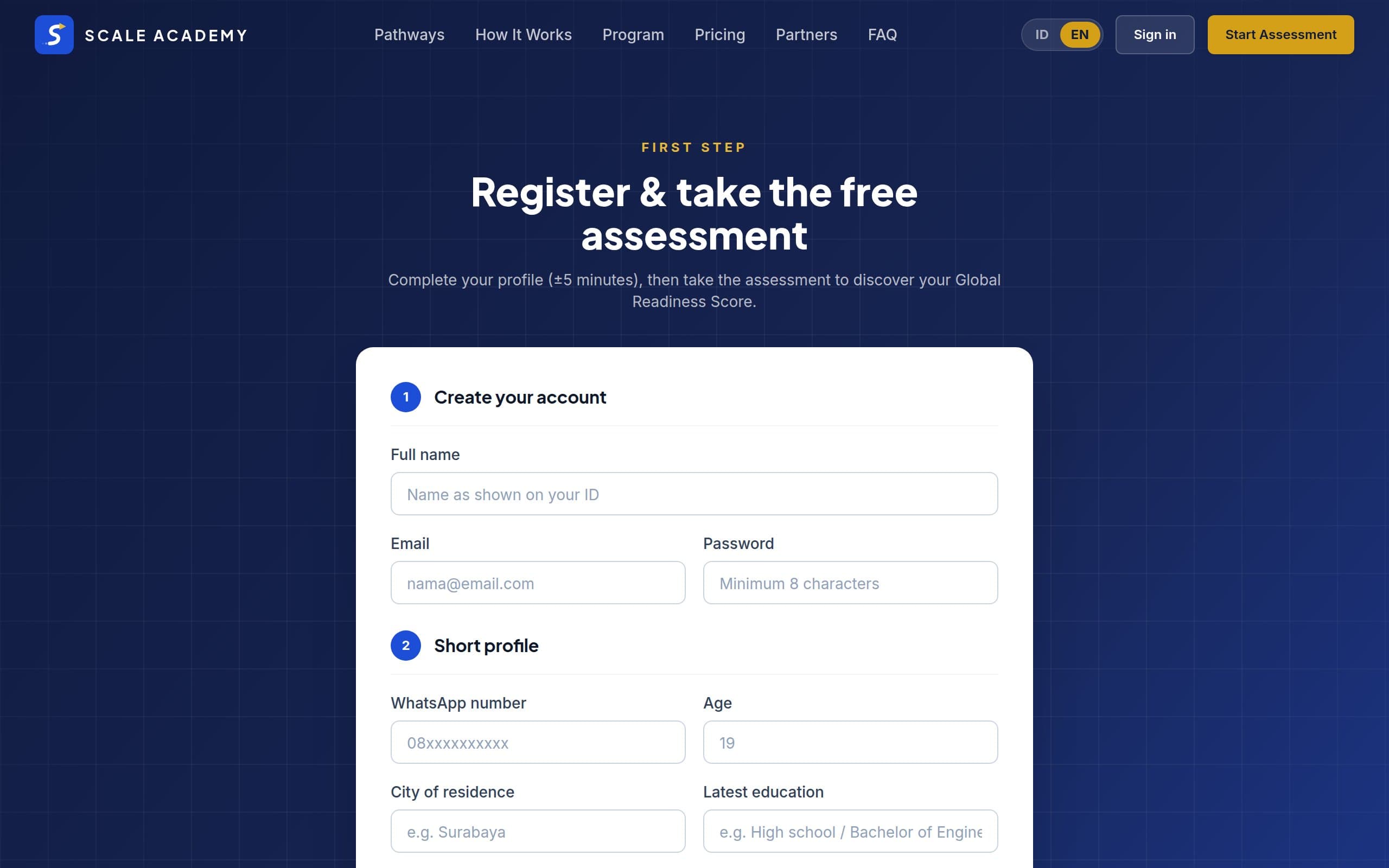
Take the 28-question assessment
Aisyah opens ki.kalayudhafoundation.org and hits “Start Assessment”. She answers 28 short questions about English, documents, academics, goals, and financial readiness — about 10 minutes, no account needed upfront.
Tip: Answer honestly, not “ideally”. An accurate starting score makes your pathway recommendation and study plan actually useful.
- 2
Step 2
Get your score & recommended pathway
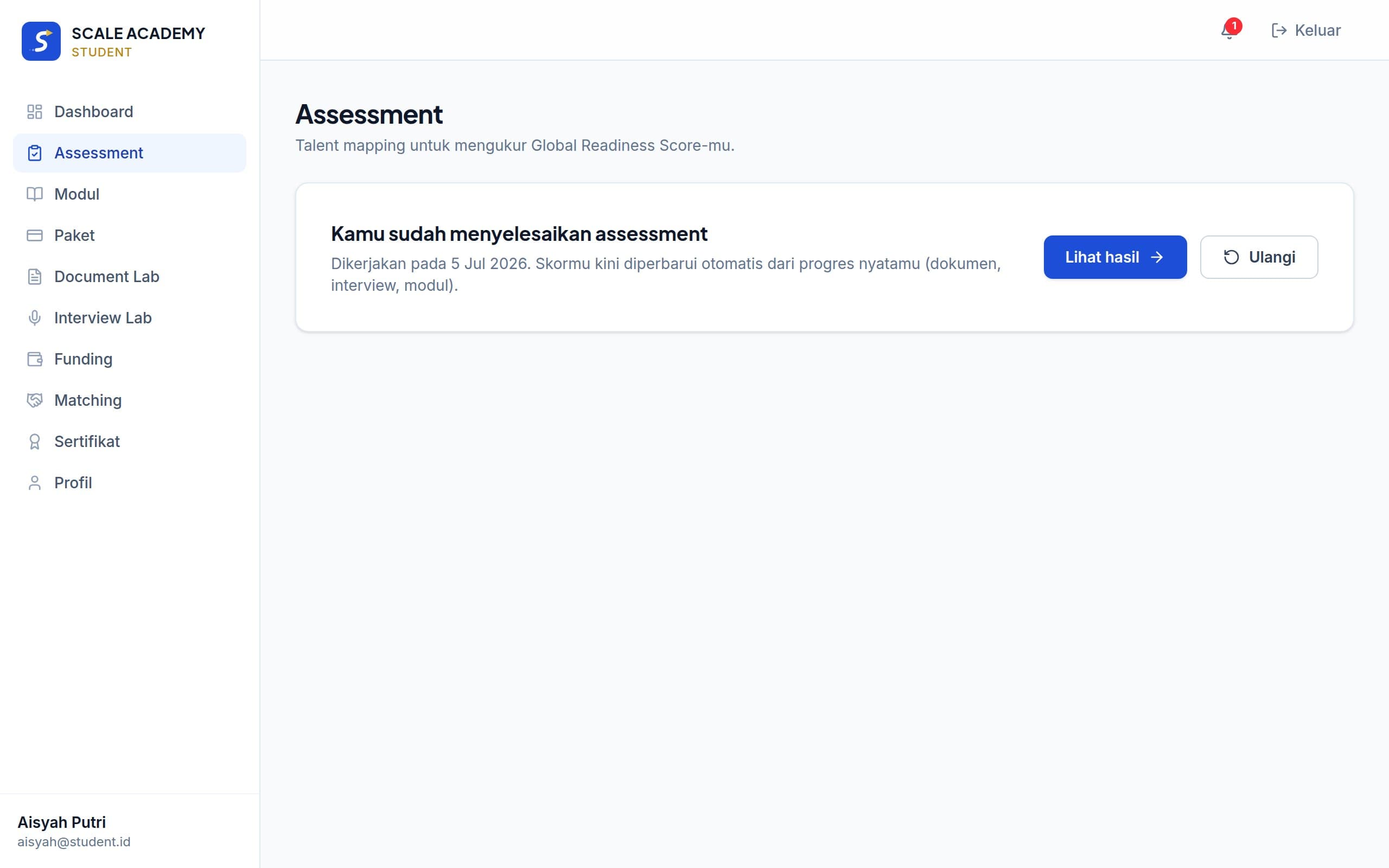
On completion, Aisyah's account is created automatically and she sees her starting score: 58, with Scholarship & Study Abroad as her recommended pathway. The system highlights the dimensions holding her back — English Readiness and Document Readiness — so she knows exactly where to start.
- 3
Step 3
Work track? Apply to an opening on KI Work
If your goal is to work abroad, open the Jobs menu — filter by your target country (the main matching variable; set it in your Profile), job type, or city, and save interesting openings to apply later. The opening page shows a gap analysis — your Global Readiness Score compared against the position's requirements — then apply for free. Track your application under My Applications with a dated history of every stage, and while it stays active you get basic preparation for free: e-learning modules (including work-track modules), mentor reviews of your CV, work-experience proof, skill certificates, plus 1 essay document.
Tip: We never charge candidates to get a job. Someone asking for payment in KI Academy's name? That's a scam — report it via our official WhatsApp.
- 4
Step 4
Meet your dashboard: your command center
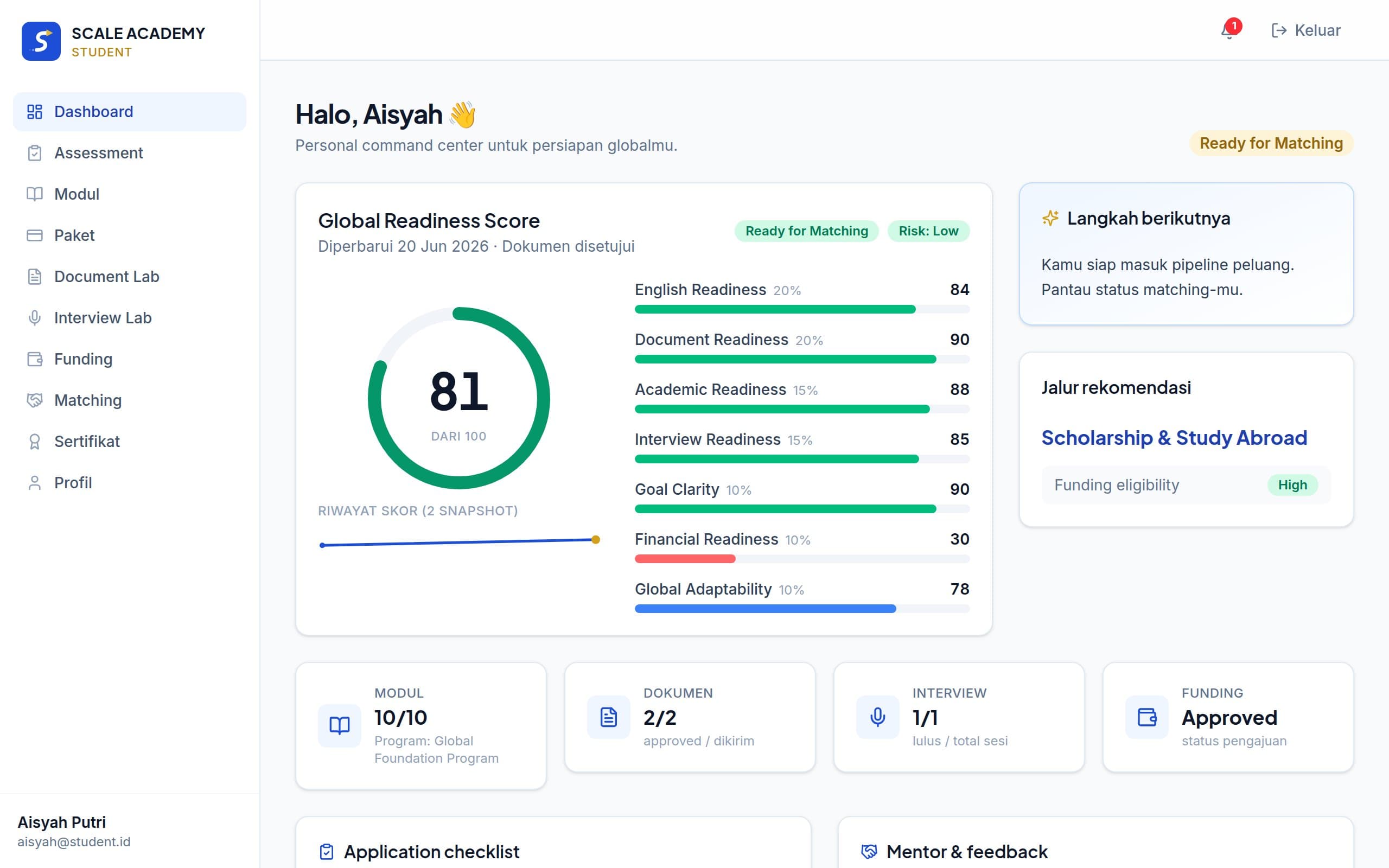
The dashboard shows your current score with its history, suggested next steps, recommended pathway, and module progress. Everything lives in the sidebar (desktop) or bottom navigation (mobile).
- 5
Step 5
Choose the right plan
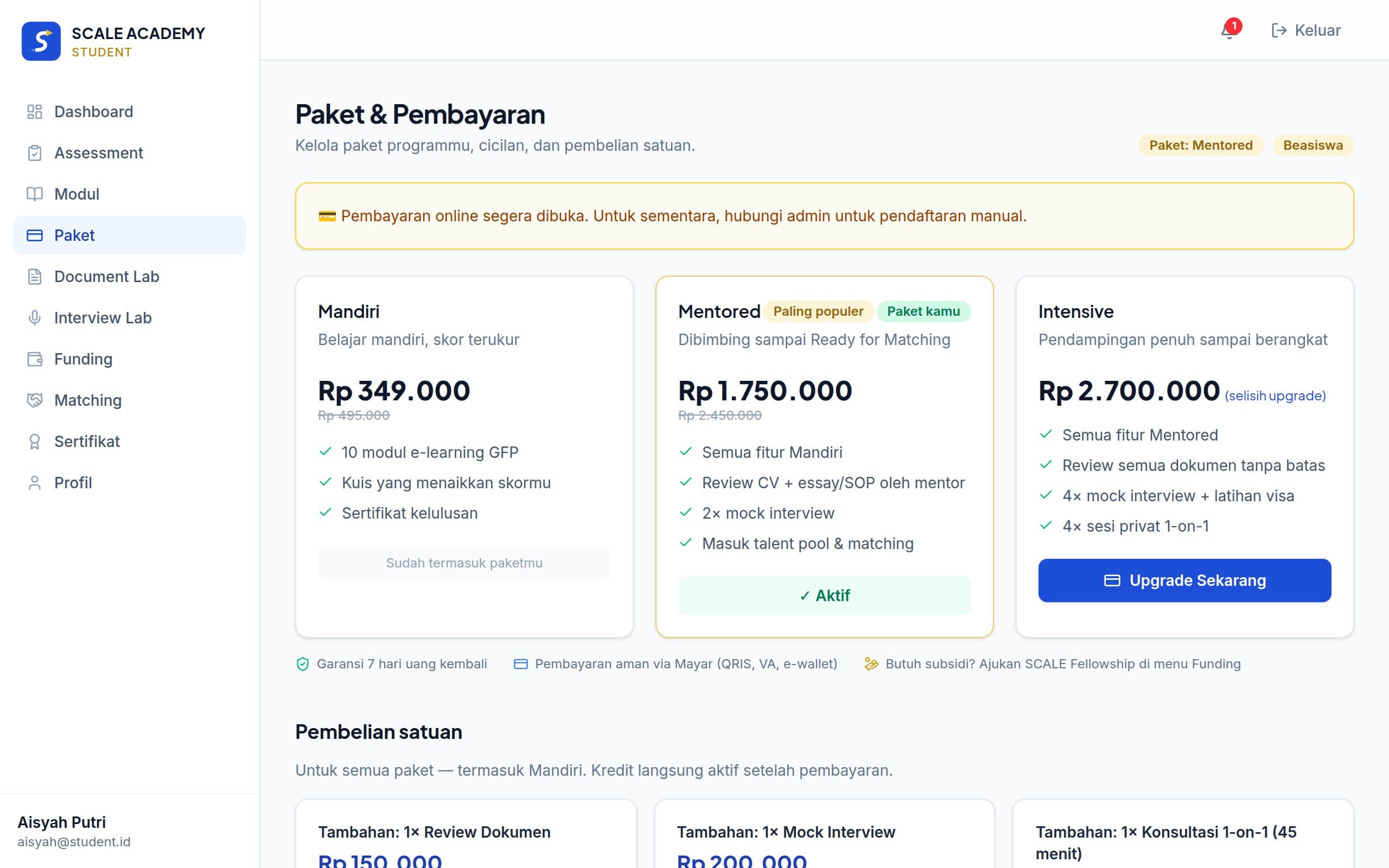
On the Plans page, Aisyah compares Mandiri (self-paced), Mentored (guided until Ready), and Intensive (full support). Every plan can be paid in full or in 2 installments — the down payment unlocks e-learning, settlement unlocks mentor features. There's a 7-day money-back guarantee.
Tip: Tight budget? Apply for the KI Fellowship in the Funding menu before buying a plan — 50% or 100% subsidies for high-potential candidates.
- 6
Step 6
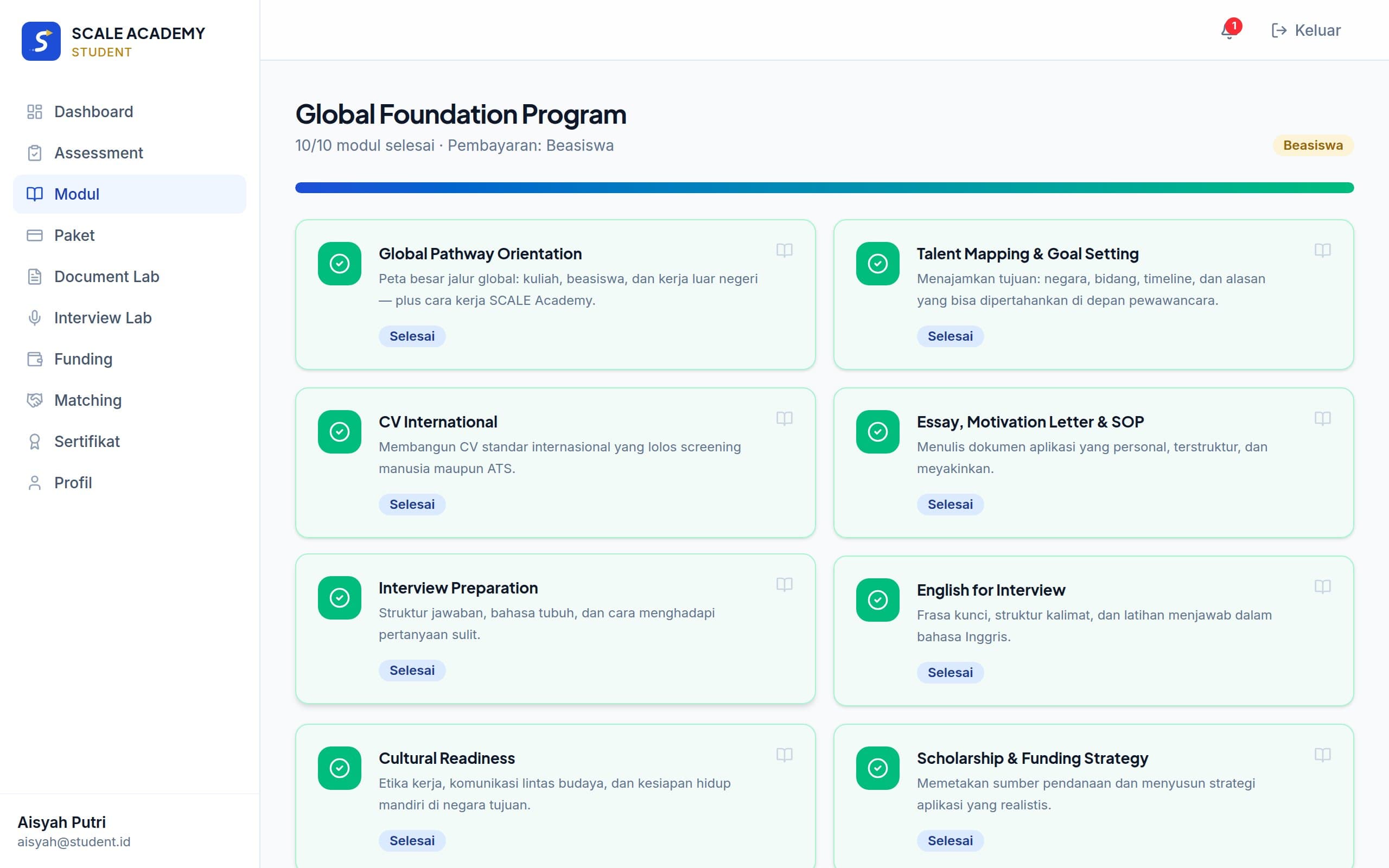
Complete the 10 Global Foundation Program modules
Modules cover global mindset, international CVs, essays/SOPs, interviews, and departure preparation. Every completed module immediately raises your score — progress is visible on the dashboard.
- 7
Step 7
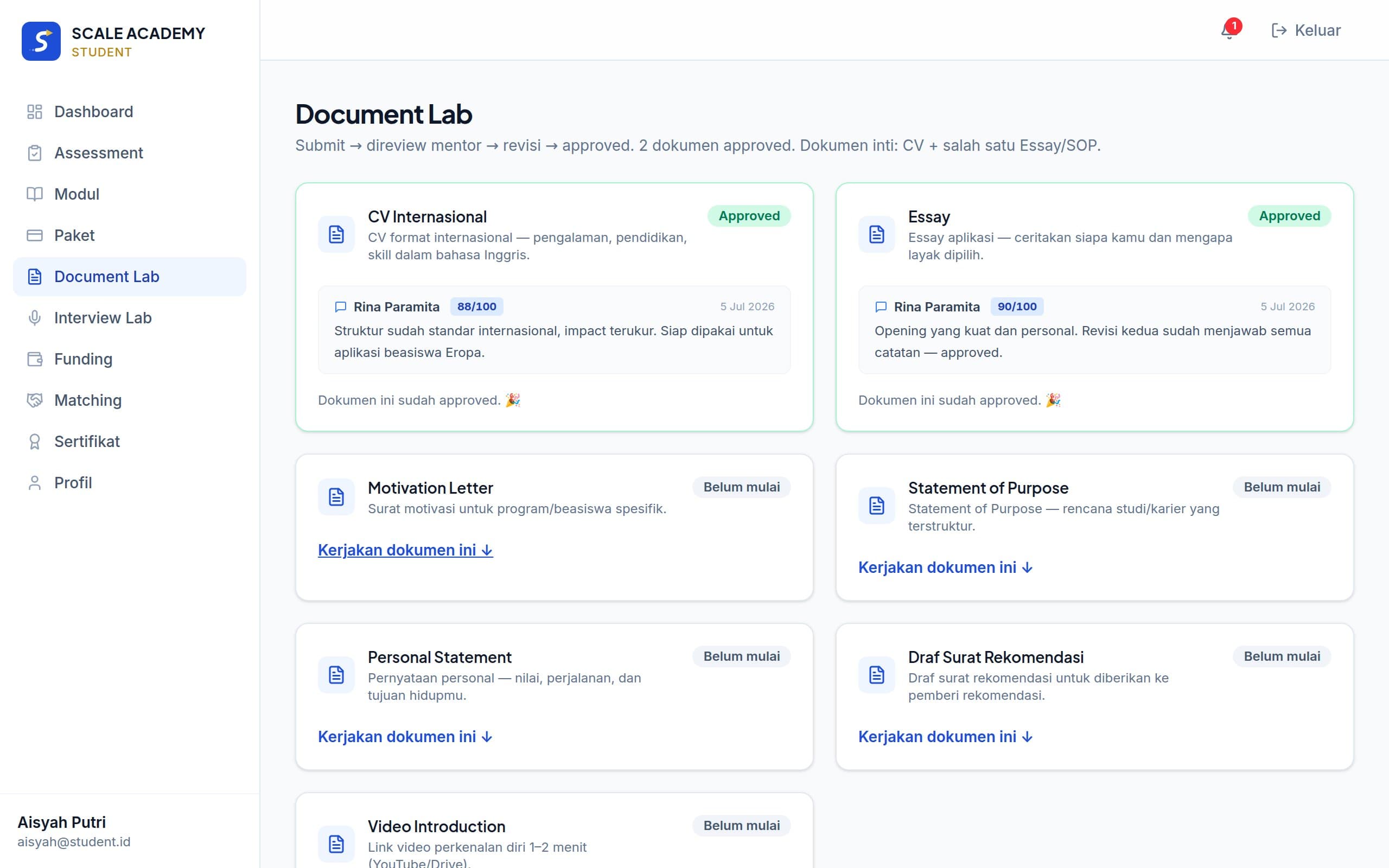
Submit documents to the Document Lab
Aisyah writes her international CV right on the platform and submits it. Mentor Rina reviews it with comments and a score; the status is NEEDS_REVISION. Aisyah revises and resubmits — this time APPROVED, and her Document Readiness jumps.
Tip: Resubmitting the same document doesn't consume your review quota. Focus on fixing what the mentor's comments point out.
- 8
Step 8
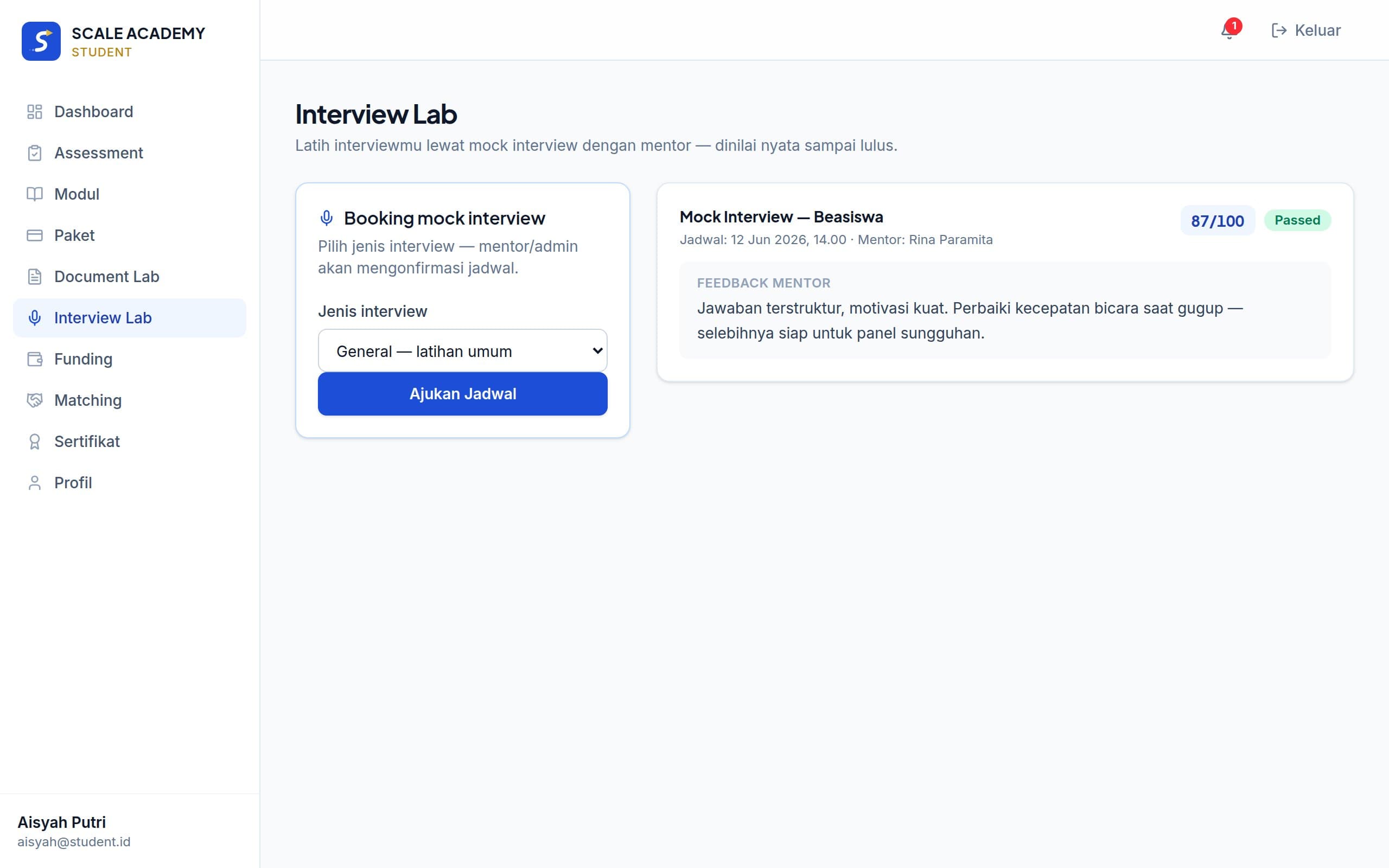
Practice in the Interview Lab
She requests a Scholarship-type mock interview slot. The mentor confirms, the session runs over video call, then the mentor submits a score and notes. Passing (≥75) significantly lifts her Interview Readiness.
- 9
Step 9
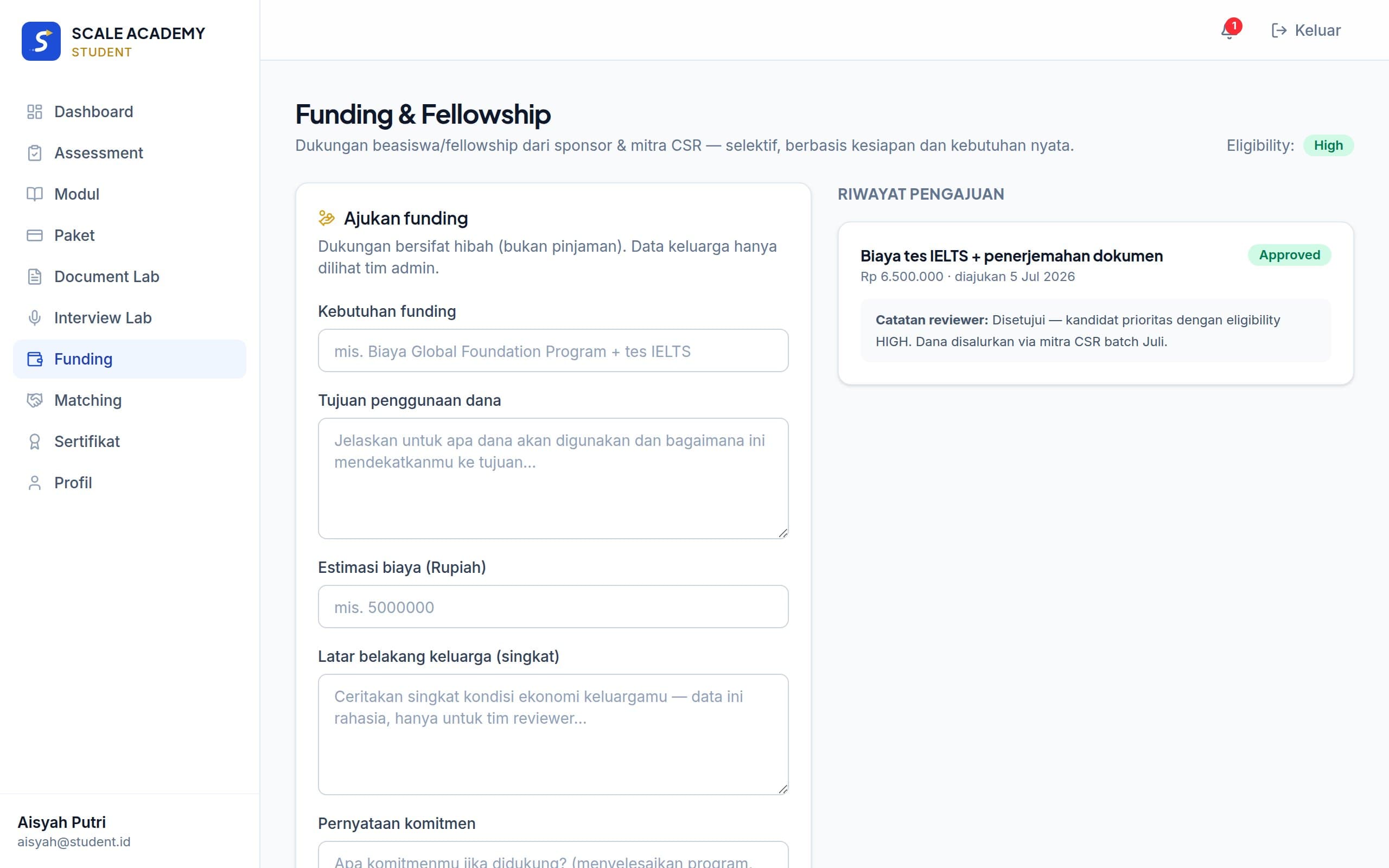
Apply for funding if needed
In the Funding menu, Aisyah fills in her financial-need profile (this data is private — only admins see it). The admin approves a 50% KI Fellowship: the discount appears automatically on the Plans page.
- 10
Step 10
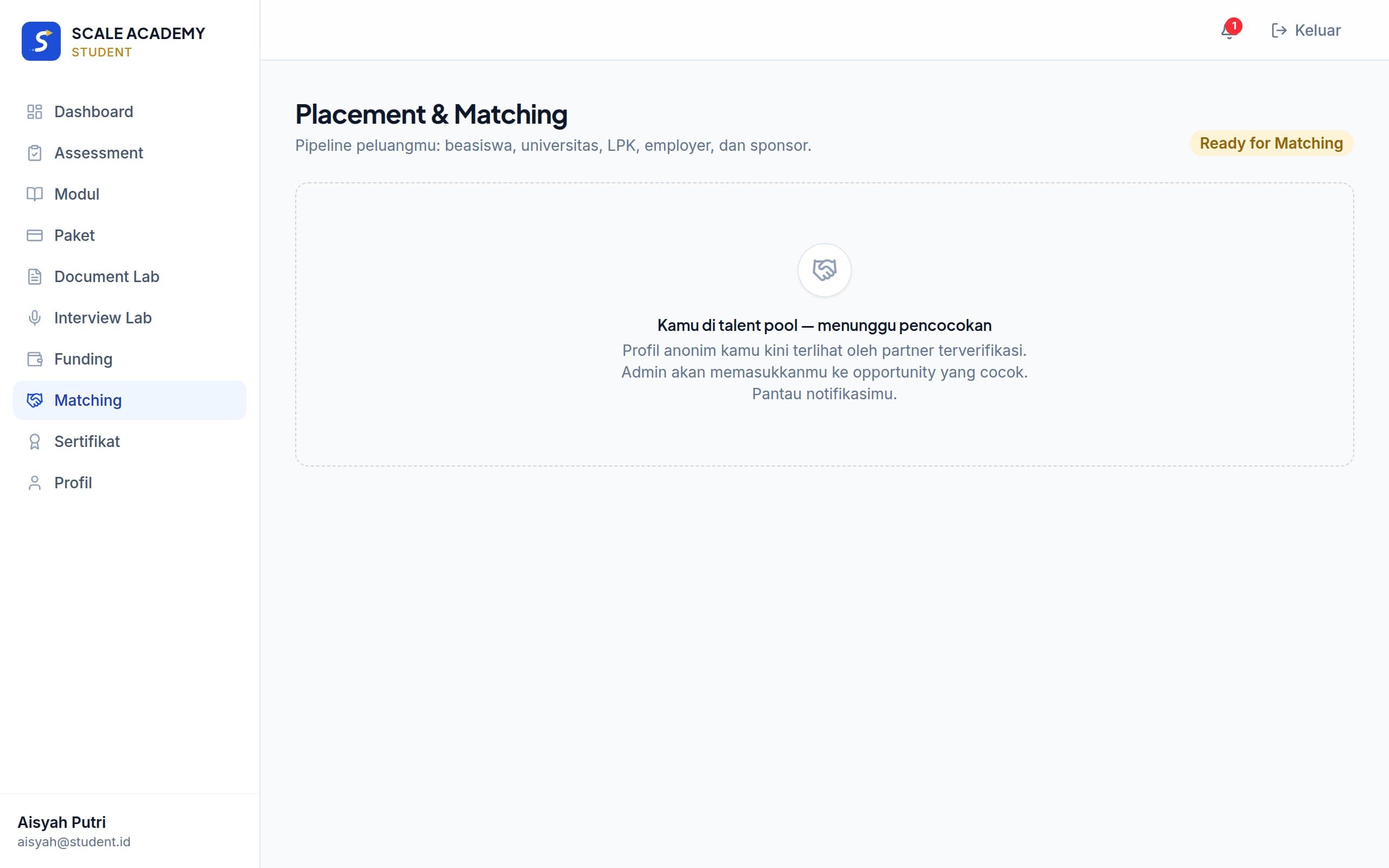
Reach Ready for Matching
Aisyah's score passes 81, her CV and essay are APPROVED, one mock interview is PASSED — the system automatically marks her Ready for Matching. Her anonymous profile (code SCA-0001, no name or contact) now appears in the partner talent pool.
- 11
Step 11
Partner interested → approval → connected
A licensed placement agency shortlists her profile and requests contact access. The admin approves, Aisyah gets notified, and her contact opens up for that partner. From here, the process moves to real placement.
Tip: Your contact details are NEVER visible to partners without admin approval — and you're always notified when a partner shows interest.
Common scenarios
Limited budget, still want mentoring
Apply for the KI Fellowship from the Funding menu before buying a plan. Approved at 100% → the Mentored plan activates immediately on scholarship status. At 50% → the plan price is automatically halved on the Plans page.
Start with Mandiri, upgrade to Mentored later
No need to pay from scratch — the Upgrade button charges only the difference (Mentored price minus what you already paid for Mandiri).
On Mandiri but need one document reviewed
Buy single credits under “A-la-carte”: 1× document review, 1× mock interview, or 1× consultation — no plan upgrade required.
Can't pay in full this month
Choose “2× installments”. The 50% down payment unlocks all e-learning immediately; settling within 30 days unlocks mentor reviews and the Interview Lab.
Want to work abroad with zero budget
No plan purchase needed. Apply to an opening on KI Work (free) — while your application is active, e-learning modules open up and your CV + 1 essay document get mentor reviews at no cost. Preparation costs are covered by employers/placement partners, never by candidates.
Common issues & fixes
I've paid but the status still says “awaiting payment”+
Mayar payments usually confirm within seconds to minutes. Reload the Plans page. If nothing changes after 15 minutes, don't pay again — reopen the same payment link from the “Continue payment” banner, or contact the admin mentioning your account email.
My document keeps getting rejected / sent back for revision+
Read the mentor's comments on the document card — they state exactly what's missing. Revise the content in the editor and resubmit (free, doesn't consume quota). Most documents get APPROVED within 1–2 revision rounds.
My score isn't going up+
The score only rises from verified actions: completed modules, APPROVED documents (not just submitted), and PASSED mock interviews. Check the dimension breakdown on your dashboard — tackle the heavyweight dimensions first (English 20%, Document 20%).
The Mentored quota is full+
Quotas per batch are capped to protect mentoring quality. Join the waitlist by continuing modules on the Mandiri plan — when a new batch opens, upgrade by paying just the difference.
I want a refund+
There's a 7-day money-back guarantee from plan payment. Contact the admin; funds are returned via transfer and plan access is revoked. After 7 days, refunds are reviewed case by case.
Forgot my password and the reset email never arrived+
Check your spam folder. Make sure it's the same email you registered with. Links are valid for 1 hour — request a new one if expired. Still stuck? Contact the admin for a manual reset.
I'm a work-track candidate — what exactly is free?+
Applying to openings, gap analysis, e-learning modules, and a mentor review of your CV + 1 essay document — as long as you have at least one active application. The Interview Lab and reviews of other documents remain part of paid plans or single credits.
Mentor
Guiding candidates until they're truly ready
Persona
Rina, 34 — scholarship awardee, KI Academy mentor
Handles several assigned students. Her core duties: reviewing documents, running mock interviews, and deciding when a student is truly Ready.
Your judgment is the platform's verification engine: student scores can only reach “verified” levels through your decisions in the Document Lab and Interview Lab. Your rigor is what keeps the talent pool credible to partners.
Journey simulation
- 1
Step 1
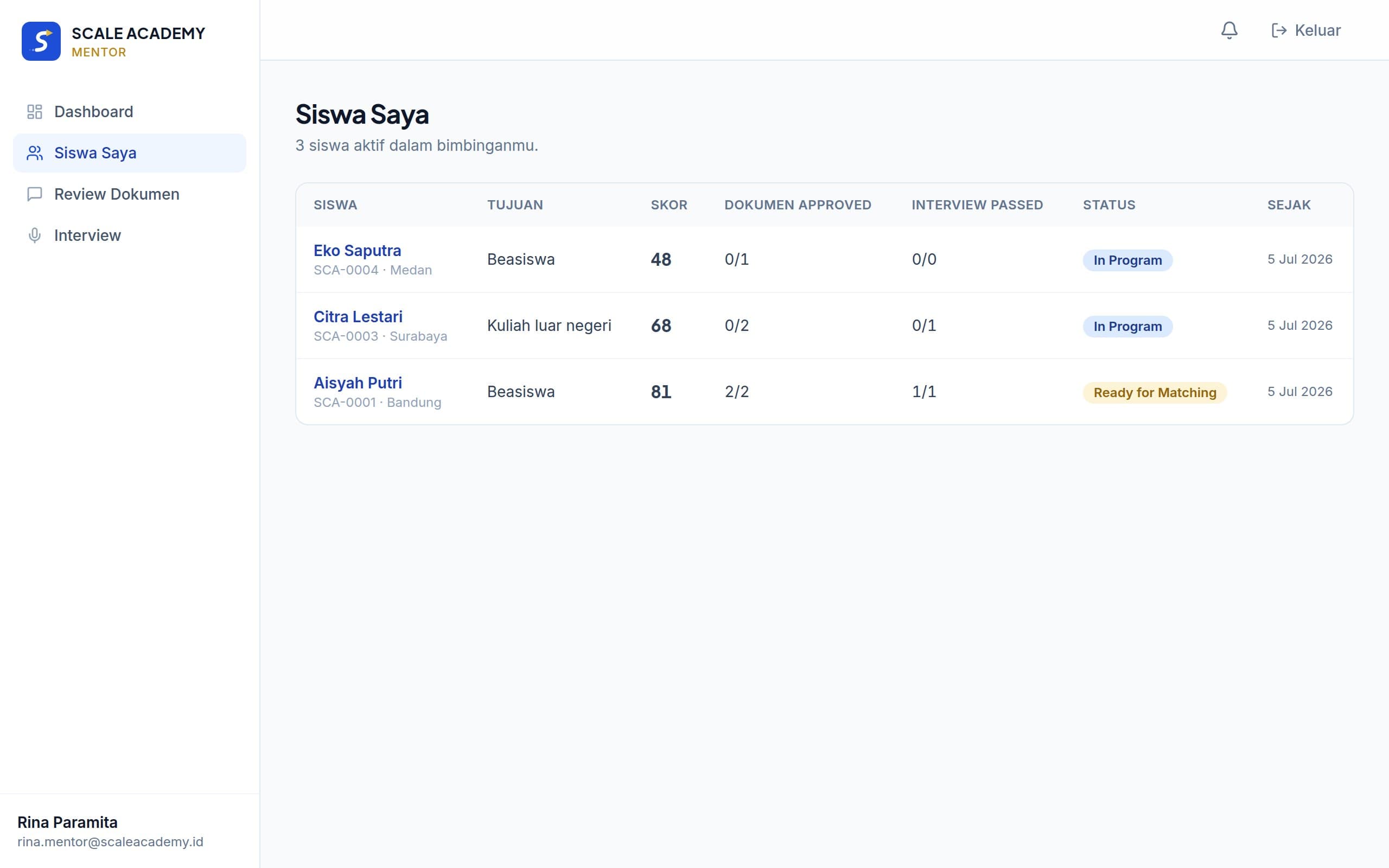
Track your assigned students
The Students menu lists everyone assigned to you by the admin, with scores, pipeline status, and recent activity. From here you can tell who's stuck and who's almost Ready.
- 2
Step 2
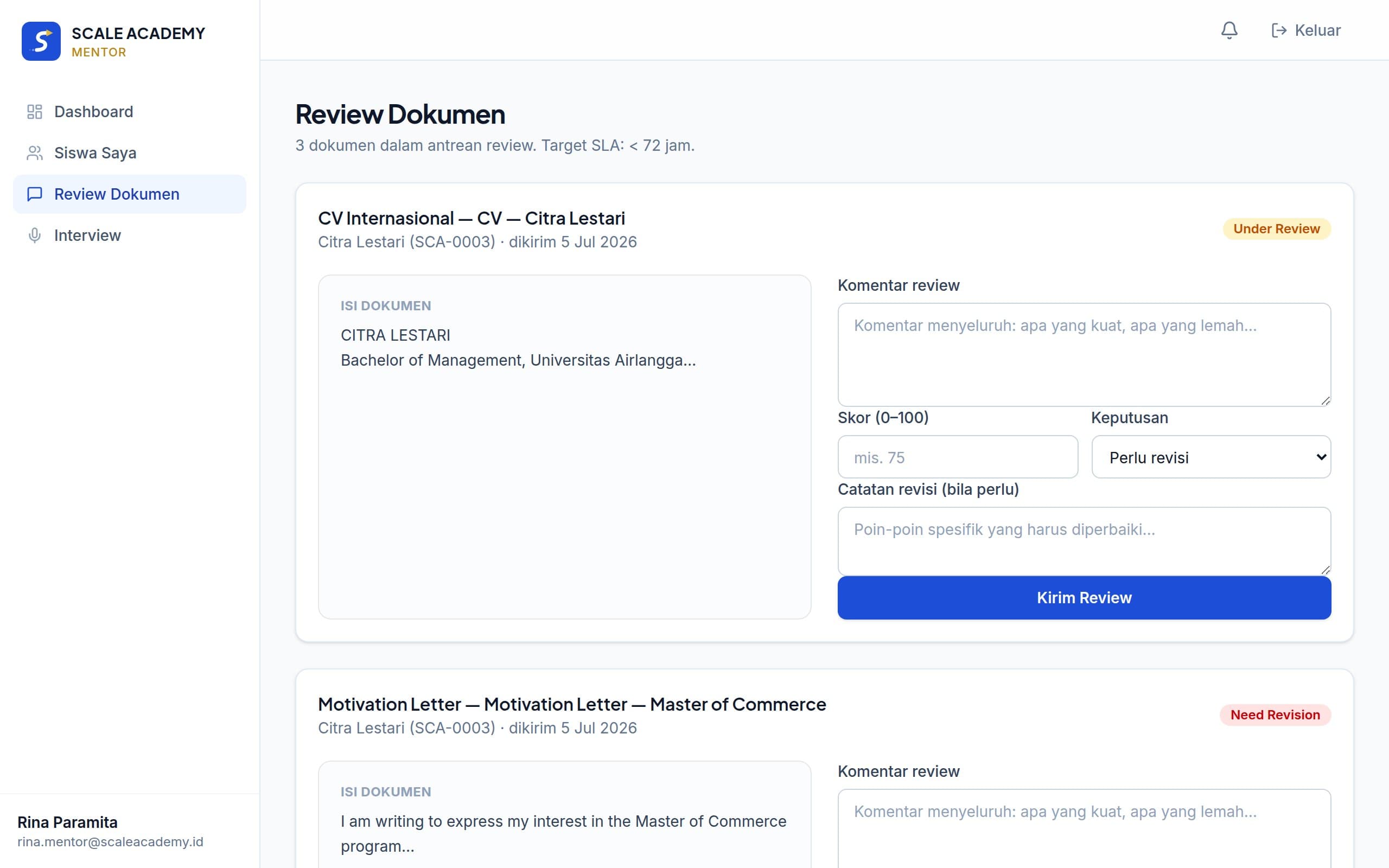
Review documents in the review panel
Every submission lands in your Reviews queue. Open the document, read the content, write specific comments, score it 0–100, then decide: APPROVED or NEEDS_REVISION. An APPROVED decision automatically raises the student's Document Readiness.
Tip: Specific comments (“replace the passive verbs in paragraph 2”) speed up revision cycles far more than general remarks.
- 3
Step 3
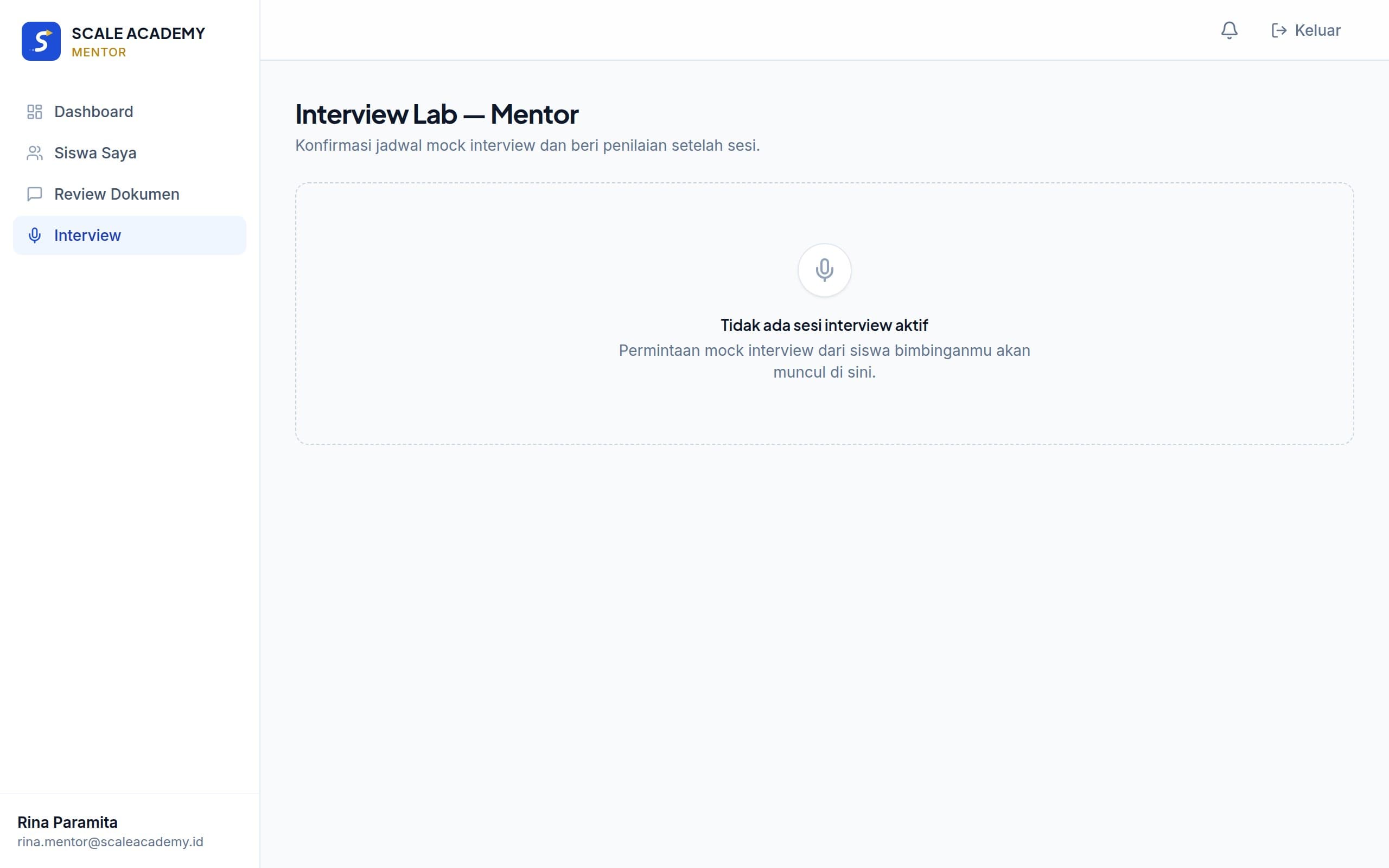
Schedule & score mock interviews
Confirm schedule requests from students, run the session (video call outside the platform), then submit the score and notes in the Interview Lab. A score of ≥75 counts as PASSED and lifts the student's Interview Readiness.
- 4
Step 4
Write notes & call readiness
Your progress notes are visible to admins (and a summarized version to partners on the anonymous profile). If you judge a student ready ahead of the numbers, use the “Ready” override — the responsibility is yours, so use it wisely.
Common scenarios
Great document, but the student's total score is still low
Approve the document — other dimensions must not hold back your objective per-document judgment. Push the student on the other dimensions through progress notes.
A student has gone quiet for weeks
Flag it in your progress notes so the admin can follow up. Scores decay slightly after long inactivity — share that with the student as motivation.
Asked to review a document outside your expertise
Tell the admin to re-assign it to a better-suited mentor — review quality matters more than speed.
A document from an unassigned job-board candidate
KI Work candidates without a mentor enter the shared queue with a “Job board candidate” badge. Whichever mentor reviews first automatically becomes their mentor — after that, the candidate appears in your assigned list as usual.
Mentor FAQ
What's the difference between a document review score and a student's dimension score?+
The review score (0–100) rates one document's quality. The system converts an APPROVED decision into a Document Readiness increase using preset weights — you never need to calculate anything.
A student resubmitted a document I sent back — does it queue again?+
Yes, it reappears in your Reviews queue with the previous version's history, so you can compare the improvements.
When should I use the Ready override?+
When you're confident a student is ready to meet partners even though their formal score isn't ≥80 yet — for example, a work-pathway candidate with strong technical skills whose academic dimension is low because it's irrelevant. The decision is recorded under your name.
Partner
A verified talent pool, no guesswork
Persona
Yuki, LPK Sakura Indonesia — licensed placement agency for Japan
Needs candidates who are genuinely ready: documents in order, mentally tested, realistic expectations. No time to sift through thousands of raw CVs.
The KI Academy talent pool only contains candidates with Ready for Matching status — every score is verified by the system and human mentors. All profiles are anonymous (candidate codes) until you receive contact approval; candidate privacy and data quality are both protected.
Journey simulation
- 1
Step 1
Browse the talent pool
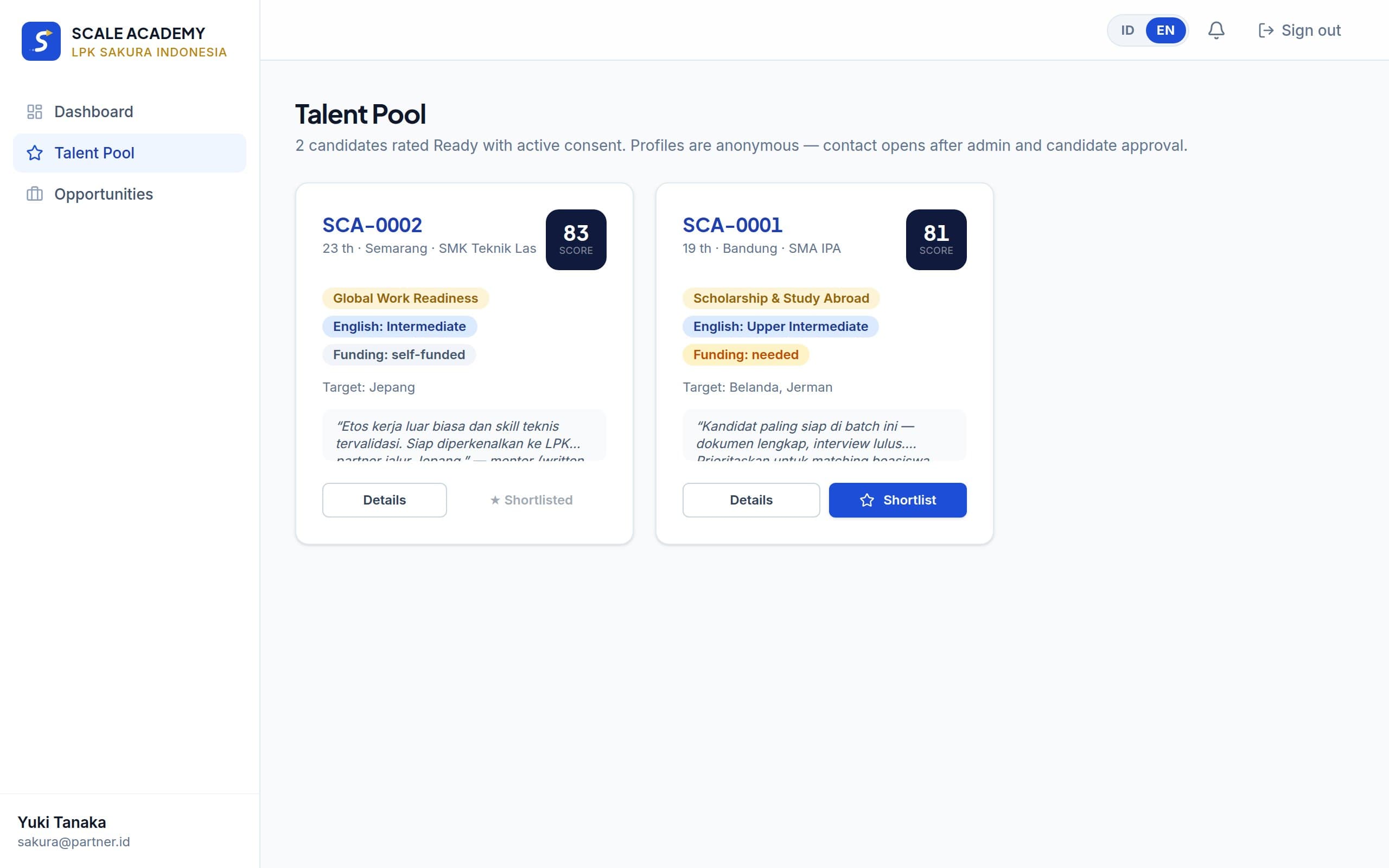
Once your partner account is verified by the admin, the Talent Pool menu shows Ready candidates with scores, pathways, target countries, and readiness summaries — without names or contact details.
- 2
Step 2
Open candidate profiles & shortlist
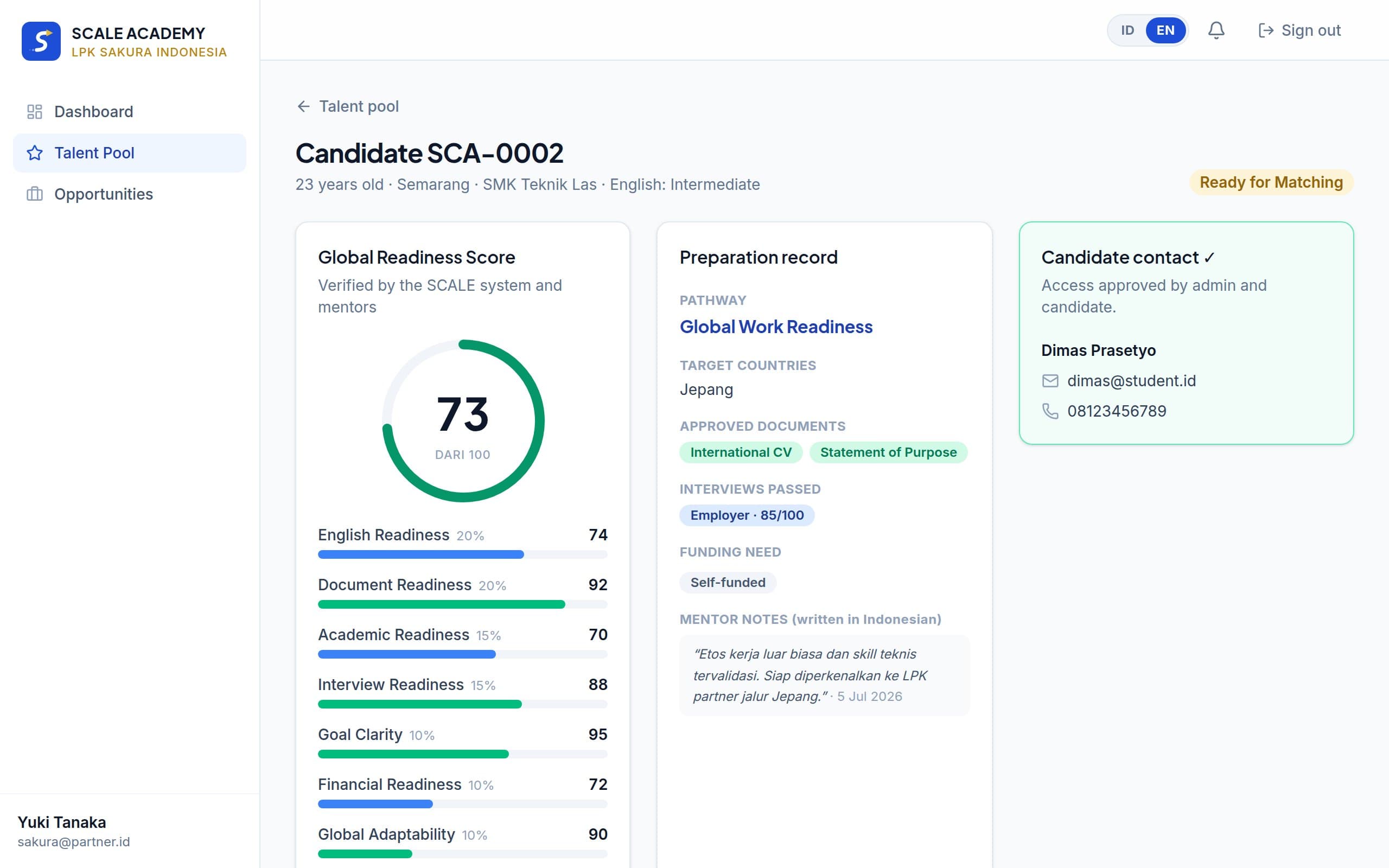
Each profile shows the Global Readiness Score per dimension, approved documents, interview results, funding needs, and mentor notes. Mark interesting candidates with a shortlist.
- 3
Step 3
Submit a contact request
Seriously interested? Send a contact request. The KI Academy admin reviews it and the candidate is notified — once approved, the candidate's name and contact open up for you on the same profile page.
Tip: Include clear opportunity context in your request — approvals move much faster when the candidate and admin understand the opportunity.
- 4
Step 4
Post opportunities
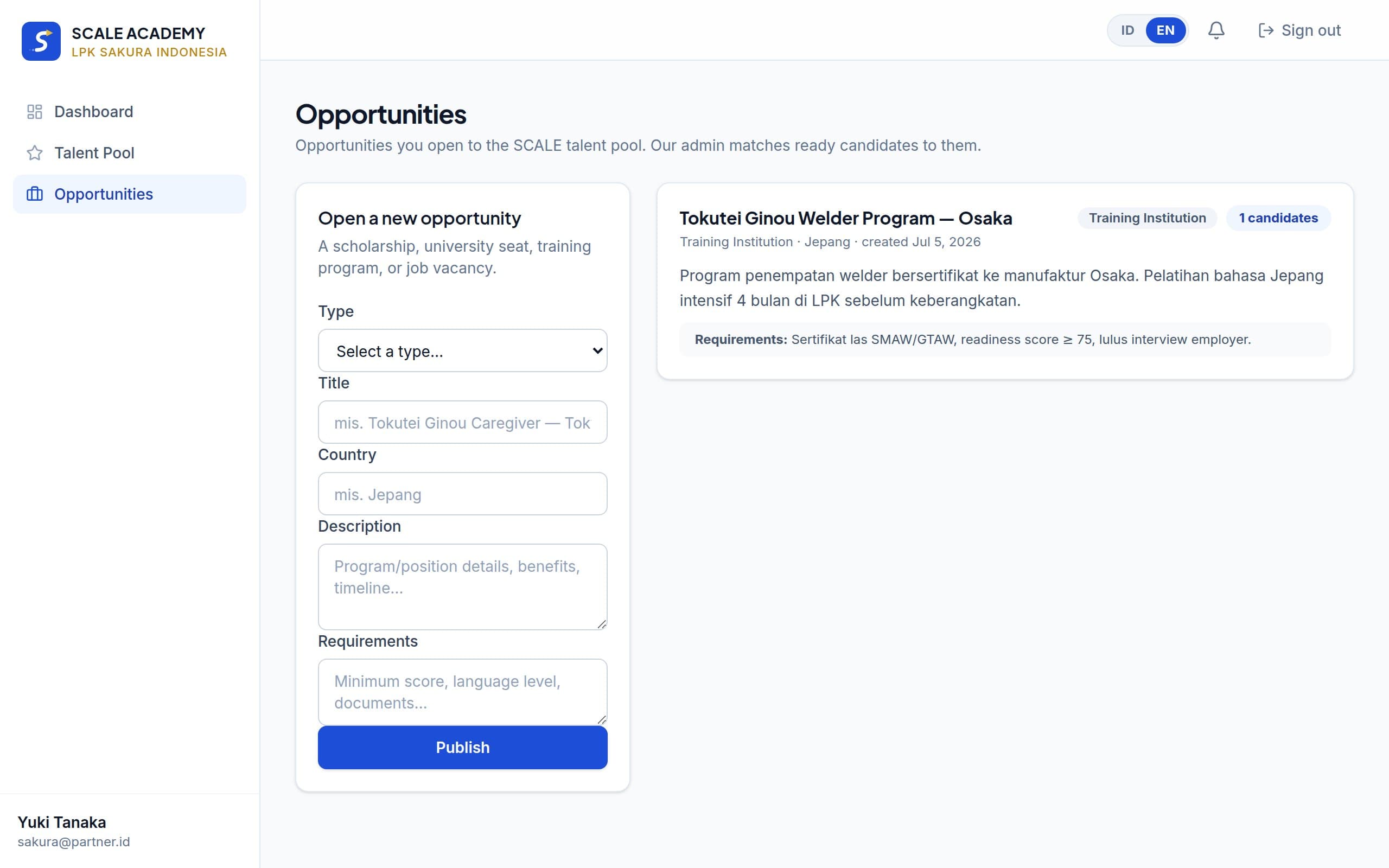
Publish your needs (study programs, scholarships, or legal job openings) in the Opportunities menu. The admin matches them with relevant candidates in the matching pipeline. Mark an opening “public” to publish it on the KI Work job board — candidates apply directly and you manage application statuses (screening, interview, hired) from the same menu.
Common scenarios
An agency needs 10 welders for Japan next quarter
Post an opportunity with clear specifications → filter the talent pool for the Global Work Readiness pathway targeting Japan → shortlist → send contact requests for chosen candidates. The KI Academy team helps coordinate the process.
A university looking for scholarship-worthy candidates
Every Scholarship & Study Abroad candidate has a mentor-reviewed essay/SOP and verified academic scores — you see proof of readiness, not claims.
Unsure about candidate quality
Every number on a profile is traceable: which modules were completed, which mentor approved each document, and mock interview results — not self-assessment.
Want your opening on the public job board
Create a job-type opportunity and mark it public — it appears on the KI Work page with a “licensed partner” badge and any candidate can apply for free. Applications arrive in real time; you move each one through to hired.
Partner FAQ
Why can't I see candidate names?+
Candidate privacy is the foundation of trust on the platform. Identities open only after your contact request is approved by the admin and the candidate is notified — this usually takes under 2 business days.
My account says “not verified”+
New partner accounts are reviewed by the KI Academy team (organizational legality, placement licenses where relevant). The talent pool stays closed during review. Contact us if it takes more than 3 business days.
Are candidate scores comparable across pathways?+
Yes — dimension weights are identical for all candidates. But mind the pathway context: work candidates excel in practical-technical readiness, study candidates in academics and documents.
Still stuck?
Most questions are answered in each role's FAQ section above. If not, contact the KI Academy team via email — include your account email and a screenshot of the issue so we can help faster.
Chat the admin on WhatsAppStart your journey